Why Serene Visuals is a top-tier shader mod for Minecraft 1.21
Developed by the talented creator itzmikey, Serene Visuals stands out as a highly recommended selection for your Minecraft client. It is fully optimized, compatibility-tested, and brings a major upgrade to the gameplay experience in Minecraft version 1.21.
⚙️ Quick Resource Specs
| Mod Creator | itzmikey |
| Latest Version | 1.21 |
| Supported Game Versions | Minecraft 1.21+ |
| File Size | 2.75 MB |
| Last Updated | |
| Total Downloads | 35,581 downloads |

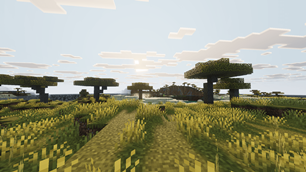
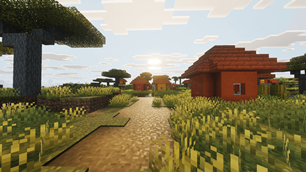
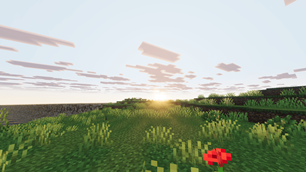
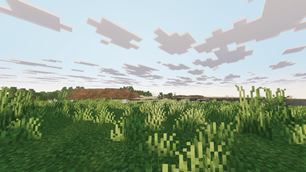
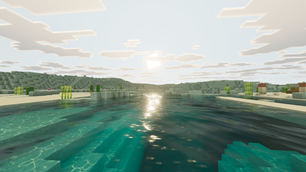
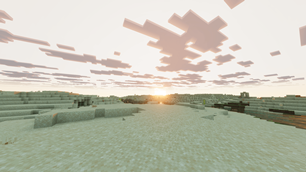
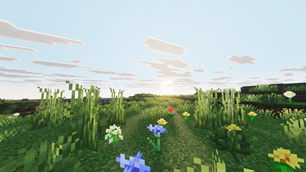
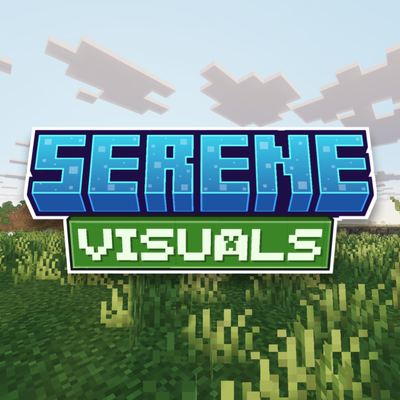
Serene Visuals is my overcast pack. Soft diffused light, cool muted tones and deep greens at ground level. Not every shader needs to be loud.
What this changes
Overcast skies
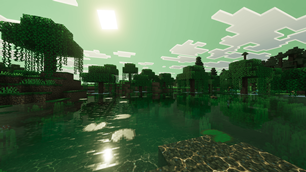
Real cloud layering across the sky rather than one flat sheet. Light comes through diffused instead of as a hard beam, which is what sets the mood for the whole pack.
No sun glare
The sun never blows out the screen. You can look toward it at midday without everything going white, which matters more in survival than it sounds.
Color grading
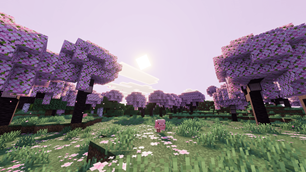
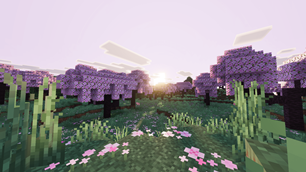
Cool and muted, kept deliberately gentle. Nothing is pushed into oversaturation and nothing goes harsh.
Foliage
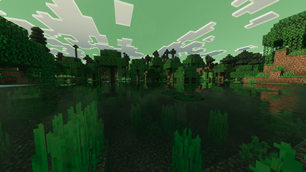
Grass and leaves go deep and rich at ground level, so the world stays green and full even though the light above it is soft.
Fog and depth
Smooth fog in the distance that gives terrain real depth. Hills and treelines separate from each other instead of stacking flat.
Consistency through the day
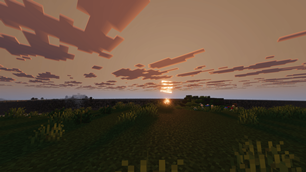
Morning, midday, under clouds and at dusk all hold the same look. There is no point in the cycle where the pack falls apart or washes out.
Requirements
THIS PACK IS FOR VIBRANT VISUALS ONLY
IT DOES NOT WORK WITH MB LOADER
Vibrant Visuals must be ON. This pack is built for Bedrock's Vibrant Visuals renderer. The pack will not do anything if it is off.
Where to turn it on: Settings > Video > Graphics > Vibrant Visuals
If that toggle is not there, your device or version does not support Vibrant Visuals yet.
About my other packs
I have several other shader packs on my page, and they are not recolors of this one. Each is built with its own style. The atmospherics, lighting, color grading, water and PBR are set up separately in every pack, so no two of them behave the same way in game.
If you want to explore the rest, everything I have made is here:
Installation
- Download the .mcpack file
- Open it. Minecraft imports it on its own.
- In your world go to Settings > Global Resources and activate Serene Visuals
- Turn on Settings > Video > Vibrant Visuals
- If the lighting still looks the same, leave the world and load it again once
Permissions
YOU ARE ALLOWED TO
- Make a review or showcase video. YouTube, TikTok, Instagram, any platform. All I ask is that you link this CurseForge page in the description.
- Use the pack in your own gameplay videos and streams. No permission needed, go ahead.
- Modify the pack for your own personal use. Tweak whatever you want on your own device. The modified version has to stay with you though. It cannot be uploaded or shared publicly anywhere.
- Share this page with friends or in servers.
YOU ARE NOT ALLOWED TO
- Upload a modified version. Editing my pack and releasing it under your own name, or claiming it as your own work, is not allowed.
- Use assets from this pack in your own pack. If you want to use something from it, contact me on Discord first and ask.
- Put the download behind your own link. If you make a review video, link my official project page and nothing else. No monetized links, no link shorteners, no ad links, and no direct download that you host yourself.
- Reupload the pack anywhere else.
FAQ
The pack is not working. Nothing changed after I installed it.
I get this comment a lot, and almost every single time the reason is the same. Vibrant Visuals is turned off.
This pack only works when Vibrant Visuals is ON. That is written clearly at the top of this page. With it off, the pack loads fine but nothing on your screen changes, because there is no renderer for it to work with. The pack is not broken.
Go to Settings > Video > Graphics > Vibrant Visuals and switch it on. If you cannot find that option at all, your device or Minecraft version does not support it yet.
Please check this before commenting that the pack does not work.
The sky looks cloudy and grey. Is that a bug?
No, that is the pack. Serene is built around overcast light on purpose. If you want clear blue skies, Mike Visuals or Skyfall Visuals will suit you better.
My device heats up a lot while using this pack.
Lower your Vibrant Visuals settings in the video menu and drop your render distance a few chunks. Vibrant Visuals itself is the demanding part, and render distance costs more than anything else on phones.
Can I make a YouTube video or a review on this pack?
Yes, of course. Any platform is fine. Just link this official project page in your description.
Can I put my own download link in the video?
No. Please link my official page only. No shortened links, no monetized links, and no download you host yourself.
Can I modify the pack?
Yes, but for personal use only. Change whatever you like on your own device. You just cannot upload or publicly share the modified version.
Can I use assets from this pack in my own pack?
No, not without asking. Contact me on Discord first and we can talk about it.
Can I port this pack?
No. I do not allow third party ports, sorry.
Suggestions or problems?
Contact me on Discord: _miku_99_
You can also just drop a comment below. If it is a bug, please include your device and Minecraft version. Screenshots help a lot and I can usually get it fixed in the next update.
The Ultimate Guide to Serene Visuals
If you are exploring the vast world of Minecraft modifications, Serene Visuals by itzmikey is a standout shader that deserves your attention. With over 35,581 downloads, it has become a staple for players looking to enhance their experience. As the creator describes it, this project is "Serene Visuals brings a calm, peaceful look to Minecraft with soft overcast skies, deep lush greens, and cool muted tones. Easy on the eyes, beautiful in every biome, perfect for exploration.". Whether you are a veteran builder constructing massive cities, or simply a casual player looking to upgrade your survival world, this guide will provide you with all the essential details on how Serene Visuals alters the game.
What Makes It Special?
Unlike standard shaders that simply alter superficial elements, Serene Visuals introduces a wide array of visual and mechanical features designed to seamlessly blend into the vanilla aesthetic. itzmikey has clearly spent significant time refining the project to ensure that every aspect feels polished and responsive for version 1.21.
Installation Guide
Getting Serene Visuals up and running is straightforward. Follow these step-by-step instructions:
- Verify Your Version: Ensure your Minecraft launcher is set to version 1.21.
- Install Mod Loader (if required): If this is a mod, download the compatible loader (Forge, Fabric, NeoForge).
- Download the File: Click the secure download button above to retrieve the official file from CurseForge.
- Move the File: Place the downloaded file into your `mods`, `shaderpacks`, or `resourcepacks` folder depending on the shader type.
- Launch and Enjoy: Open Minecraft, navigate to the respective settings menu, and activate Serene Visuals.
Compatibility & Performance
Compatibility is robust. Serene Visuals is designed specifically for version 1.21, taking full advantage of the latest engine optimizations. During typical gameplay, this addition maintains a stable frame rate, though lower-end laptops might experience slight stuttering. We recommend pairing this with performance boosters like Sodium or Iris to guarantee a silky-smooth experience.