
Why Shiny Player - Myloveee is a top-tier texture pack mod for Minecraft 1.21
Developed by the talented creator Myloveee, Shiny Player - Myloveee stands out as a highly recommended selection for your Minecraft client. It is fully optimized, compatibility-tested, and brings a major upgrade to the gameplay experience in Minecraft version 1.21.
⚙️ Quick Resource Specs
| Mod Creator | Myloveee |
| Latest Version | 1.21 |
| Supported Game Versions | Minecraft 1.21+ |
| File Size | 1.64 MB |
| Last Updated | |
| Total Downloads | 1,052 downloads |

✨ Shiny Player — Myloveee
Make your Minecraft Bedrock player shine! ✨
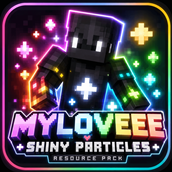
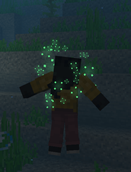
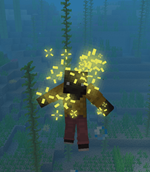
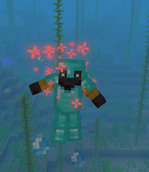
Shiny Player — Myloveee is a lightweight cosmetic resource pack that adds a stylish shiny particle effect to your player whenever armor is equipped.
The goal is simple: keep Minecraft looking like Minecraft while adding a small, polished visual effect that makes your character stand out. No gameplay changes, no behavior pack, and no complicated setup.
✨ FEATURES
💫 Shiny Armor Effect
A sparkling particle effect appears around the player while armor is equipped, adding a subtle but eye-catching visual touch to your character.
🎨 9 Vibrant Colors
Choose the color that fits your skin, armor, or personal style:
⚪ White
🩵 Cyan
🔵 Blue
🟣 Purple
🩷 Pink
🔴 Red
🟠 Orange
🟡 Yellow
🟢 Green
⚙️ Fully Customizable
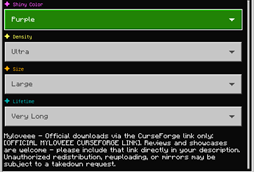
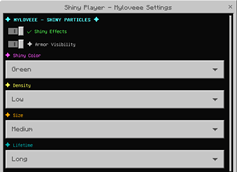
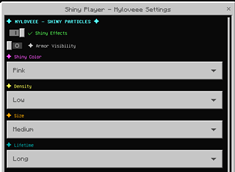
Use Minecraft's Custom Pack Settings to adjust the effect without editing the pack manually.
• ✨ Shiny Effects — ON / OFF
• 🎨 9 Color Options
• 💫 Particle Density
• 📏 Particle Size
• ⏱️ Particle Lifetime
Want something subtle? Choose a smaller size and lower density.
Want your player to stand out? Increase the density and size and choose your favorite color.
🎮 DESIGNED FOR BEDROCK
Shiny Player is made specifically for Minecraft Bedrock Edition and uses a resource-pack-based particle system.
It does not require a Behavior Pack.
The pack keeps the original armor models, textures, item bindings, and gameplay behavior intact while adding the visual effect.
🤝 ANIMATION PACK COMPATIBILITY
Shiny Player is designed with compatibility in mind.
Unlike approaches that modify the complete minecraft:player client entity, this version uses the armor attachable system for the shiny effect. This allows it to coexist much more cleanly with player-animation resource packs.
It is designed to work alongside popular animation packs such as:
✨ Action & Stuff
✨ JustAnimations
✨ HMI Bedrock
✨ XNova Remastered
✨ Other compatible player-animation resource packs
Actual compatibility can still depend on how another resource pack modifies the same armor attachables or related resources.
🚀 HOW TO USE
-
Download and import Shiny Player — Myloveee.
-
Activate the pack in your Minecraft world or Global Resources.
-
Equip armor.
-
Open the pack's Custom Settings.
-
Turn the shiny effect ON or OFF.
-
Choose one of the 9 available colors.
-
Adjust Density, Size, and Lifetime to your preferred look.
-
Enjoy your customized shiny player! ✨
No commands are required.
💎 LIGHTWEIGHT & SIMPLE
Shiny Player was designed to add visual style without unnecessarily changing other parts of Minecraft.
The pack focuses specifically on the shiny armor effect and avoids adding unrelated assets or gameplay mechanics.
That means you can keep your normal Minecraft experience while giving your armored player a little extra personality.
🌈 FIND YOUR STYLE
Whether you prefer the classic clean White sparkle, an icy Cyan, deep Blue, magical Purple, vibrant Pink, fiery Red, energetic Orange, bright Yellow, or natural Green effect — there is a color for your style.
Combine it with different armor sets and skins to create your own look.
Your player. Your armor. Your color. Your shine. ✨
⚠️ IMPORTANT INFORMATION
• This is a visual cosmetic resource pack.
• It does not add gameplay mechanics.
• It does not require a Behavior Pack.
• Custom Settings are provided through Minecraft's resource-pack settings system.
• Some settings may behave differently depending on the Minecraft Bedrock version and platform.
• Compatibility with other resource packs depends on whether those packs modify the same resources.
📢 CONTENT CREATORS & REVIEWS
Want to review, showcase, or feature Shiny Player — Myloveee on YouTube, TikTok, Instagram, or another platform?
You're welcome to showcase the pack! ❤️
However, please always include the official CurseForge download link when sharing or reviewing this pack so viewers can access the original upload.
Please do not redistribute the .mcpack itself through unofficial download mirrors, reuploads, or unauthorized reposts.
If a copy is found being redistributed without permission, the original creator reserves the right to request its removal from the hosting platform.
Please support the original creator by linking directly to the official CurseForge page.
💙 CREDITS
Created by Myloveee
Thank you for downloading, using, reviewing, and supporting Shiny Player — Myloveee.
If you enjoy the pack, sharing the official CurseForge page helps more players discover it and supports the project.
✨ Keep Minecraft simple. Keep it colorful. Keep it shiny.
— Myloveee
The Ultimate Guide to Shiny Player - Myloveee
If you are exploring the vast world of Minecraft modifications, Shiny Player - Myloveee by Myloveee is a standout texture that deserves your attention. With over 1,052 downloads, it has become a staple for players looking to enhance their experience. As the creator describes it, this project is "✨ Shiny Player — Myloveee ✨ Bring a fresh and stylish visual effect to your Minecraft Bedrock player with Shiny Player by Myloveee!". Whether you are a veteran builder constructing massive cities, or simply a casual player looking to upgrade your survival world, this guide will provide you with all the essential details on how Shiny Player - Myloveee alters the game.
What Makes It Special?
Unlike standard textures that simply alter superficial elements, Shiny Player - Myloveee introduces a wide array of visual and mechanical features designed to seamlessly blend into the vanilla aesthetic. Myloveee has clearly spent significant time refining the project to ensure that every aspect feels polished and responsive for version 1.21.
Installation Guide
Getting Shiny Player - Myloveee up and running is straightforward. Follow these step-by-step instructions:
- Verify Your Version: Ensure your Minecraft launcher is set to version 1.21.
- Install Mod Loader (if required): If this is a mod, download the compatible loader (Forge, Fabric, NeoForge).
- Download the File: Click the secure download button above to retrieve the official file from CurseForge.
- Move the File: Place the downloaded file into your `mods`, `shaderpacks`, or `resourcepacks` folder depending on the texture type.
- Launch and Enjoy: Open Minecraft, navigate to the respective settings menu, and activate Shiny Player - Myloveee.
Compatibility & Performance
Compatibility is robust. Shiny Player - Myloveee is designed specifically for version 1.21, taking full advantage of the latest engine optimizations. During typical gameplay, this addition maintains a stable frame rate, though lower-end laptops might experience slight stuttering. We recommend pairing this with performance boosters like Sodium or Iris to guarantee a silky-smooth experience.