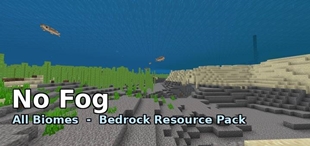
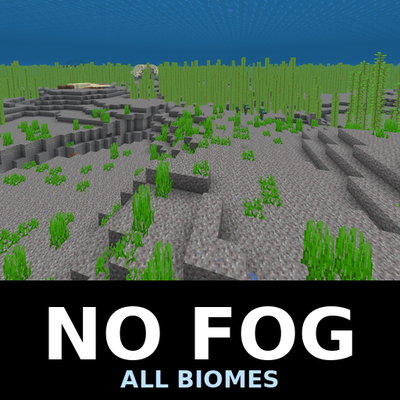
Why No Fog - All Biomes is a top-tier texture pack mod for Minecraft 1.21.132
Developed by the talented creator KENPITU, No Fog - All Biomes stands out as a highly recommended selection for your Minecraft client. It is fully optimized, compatibility-tested, and brings a major upgrade to the gameplay experience in Minecraft version 1.21.132.
⚙️ Quick Resource Specs
| Mod Creator | KENPITU |
| Latest Version | 1.21.132 |
| Supported Game Versions | 1.21.132, 1.21.131, 1.21.130, 1.21.124, 1.21.123 |
| File Size | 30.61 KB |
| Last Updated | |
| Total Downloads | 8,133 downloads |
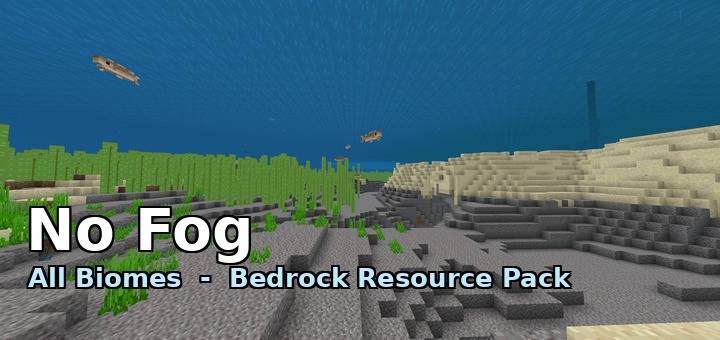
Removes Minecraft's fog - water, air, weather, lava and powder snow - in every biome.
Four levels
Pick one from the dropdown in the pack settings. They are listed in this order, and the last one is selected automatically, so most players never need to open the dropdown at all.
Water only.
All, Nether keeps fog.
All except lava.
All. This is the recommended one and the default.
What changes
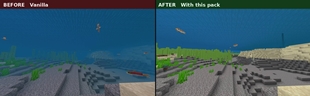
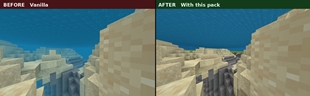
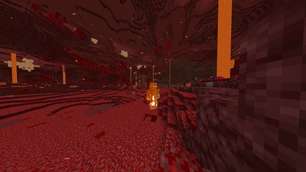
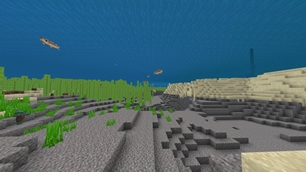
Water. Vanilla fog ends at 60 blocks. Removed, so you can see across the sea floor.
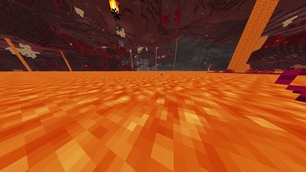
Lava. Vanilla fog ends at 0.64 blocks. Removed, so you can look at a distant wall while swimming in a lava sea.
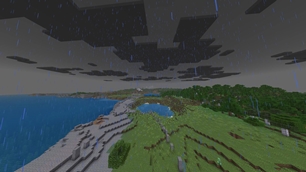
Weather. Vanilla fog runs from 23 to 70 percent of your render distance. Removed, so rain no longer closes in your view.
Air. The distance haze is removed.
Powder snow. Vanilla fog ends 2 blocks ahead. Removed.
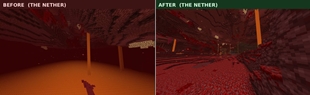
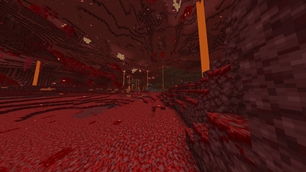
Nether. Vanilla air fog there is only 15 to 20 blocks, so this is the biggest change of all. Choose "All, Nether keeps fog" if you want to keep that closed-in atmosphere.
Vibrant Visuals
Tested with Vibrant Visuals enabled. Water, lava and the Nether are cleared exactly the same as without it.
One thing this pack cannot touch: Vibrant Visuals has its own volumetric fog, the hazy light shafts around light sources. That is a separate system from biome fog, so no resource pack can change it. It has its own toggle in the video settings if you don't want it.
Vibrant Visuals also uses its own render distance slider, so how far you can see is capped by that rather than by this pack.
About the comparison screenshots
Vanilla water fog is not constant. Right after you dive it sits at about 15 blocks, then it opens up over roughly 30 seconds and settles at 60. The before shots on this page were taken after it had fully settled. That is the fairest comparison, not the murkiest possible frame.
Important: put this pack at the top of your active list
This pack replaces the biome fog definitions, and only the topmost pack that does so is used. If another pack sits above this one, this one does nothing.
Notes
Resource pack only. No behaviour pack, no scripts, no commands. Achievements are unaffected.
Fog is not render distance. You still only see as far as your render distance setting allows. On a server, that server's render distance still applies.
Servers that use the /fog command will override this pack, because the command layer takes priority.
Removing weather fog is a real visibility advantage in PvP. Check your server or tournament rules.
This is not an X-ray. Block rendering is untouched, so hidden blocks stay hidden. Lava looks completely normal from the outside and only turns clear once the camera is inside it.
Per-biome water colours are preserved. All 94 vanilla biome entries are kept as they are and only the fog reference is changed, so swamp water is still swamp water.
All four levels work the same on every device, including phones and tablets.
The pack name and description are translated into all 29 languages Minecraft offers, so it shows in your own language in game.
67 files, 31 KB. No textures, just fog definitions.
Installation
Download the .mcpack and open it. Enable it under Global Resources in settings. Move it to the top of the list and pick a level from the dropdown.
Development notes
Four things that took the longest to get right, in case they help other pack makers.
Your own namespace. Fog definitions in the minecraft: namespace cannot be overridden from a resource pack. A file that reuses a vanilla fog identifier is simply ignored. This pack defines its own fog, kentotukun:no_fog, points every biome's fog_identifier at it, and sets remove_all_prior_fog to true.
Two biome formats. Biomes are now defined in two places: the older biomes_client.json and newer per-biome files in the biomes folder. Some biomes, including the deep dark, lush caves, the pale garden and every mutated variant, exist only in the newer format. Replacing only the older file leaves fog in those biomes.
fog_start. Fog density is calculated between fog_start and fog_end. A fog_start of 0 leaves a faint tint at every distance. Moving fog_start beyond the visible range is what removes fog completely.
memory_tier. Subpacks with different memory tiers are picked by device memory, so a low-memory phone may not get the level you meant as the default. Giving every subpack the same tier makes the game pick the last one in the list on every device.
Author: kentotukun
日本語
Minecraft の霧(水中・地上・天候・溶岩・粉雪)を、すべてのバイオームで消します。
4段階
パックの設定のドロップダウンから選びます。この順番で並んでいて、一番下が自動で選ばれるので、ほとんどの人はドロップダウンを開く必要がありません。
水中だけ消す
ネザーは霧を残す
溶岩以外すべて消す
すべて消す。おすすめで、最初からこれが選ばれています。
何が変わるか
水中:バニラの霧は60ブロックで見えなくなります。消えるので、海底の向こうまで見えます。
溶岩:バニラの霧は0.64ブロックです。消えるので、溶岩の海を泳ぎながら遠くの壁が見えます。
天候:バニラの霧は描画距離の23〜70%にかかります。消えるので、雨でも視界が狭くなりません。
地上:遠くのかすみが消えます。
粉雪:バニラの霧は2ブロック先までです。これも消えます。
ネザー:バニラの霧は15〜20ブロックしかないので、一番大きく変わります。閉じた雰囲気を残したいなら「ネザーは霧を残す」を選んでください。
Vibrant Visuals(ビデオ設定の項目)
Vibrant Visuals をオンにした状態でも確認しています。水中・溶岩・ネザーは、オフのときと同じように霧が消えます。
このパックで消せないものが1つあります。Vibrant Visuals には、光の周りのモヤ(ボリュメトリックフォグ)があります。これはバイオームの霧とは別の仕組みなので、どのリソースパックでも変えられません。いらない場合は、ビデオ設定でオフにできます。
Vibrant Visuals は描画距離のスライダーも別なので、見える距離はそちらで決まります。
比較画像について
バニラの水中の霧は一定ではありません。潜った直後は約15ブロックで、30秒ほどかけて60ブロックまで広がります。このページの「前」の画像は、広がりきってから撮りました。一番濁った瞬間ではなく、一番公平な比べ方にしています。
重要:このパックは有効リストの一番上に置いてください
このパックはバイオームの霧の定義を置き換えます。同じことをするパックが複数あると、一番上のものだけが使われます。上に別のパックがあると、このパックは効きません。
注意
リソースパックだけです。ビヘイビアーパック・スクリプト・コマンドは入っていません。実績は無効になりません。
霧は描画距離とは別です。見える距離は描画距離の設定までです。サーバーでは、サーバーの描画距離が優先されます。
/fog コマンドを使うサーバーでは、コマンドが優先されます。
天候の霧が消えるのは、PvP で実際に有利になります。サーバーや大会のルールを確認してください。
透視(X-ray)ではありません。ブロックの描画は変えていないので、隠れたブロックは見えません。溶岩も外から見ると普通で、カメラが中に入ったときだけ透けます。
バイオームごとの水の色はそのままです。バニラの94個のバイオームを残して霧の参照だけを変えているので、沼の水は沼の色のままです。
4段階すべて、スマホやタブレットを含むどの端末でも同じように使えます。
パック名と説明は、Minecraft で選べる全29言語に翻訳しています。
67ファイル・31 KB です。テクスチャはなく、霧の定義だけです。
入れ方
.mcpack をダウンロードして開きます。設定の「グローバルリソース」で有効にして、リストの一番上に移動し、ドロップダウンで段階を選びます。
開発メモ
いちばん時間がかかった4つのことです。パックを作る人の参考になればと思います。
自分の名前空間:minecraft: の名前空間の霧の定義は、リソースパックから上書きできません。バニラと同じ名前の霧を置いても無視されます。このパックは自分の霧(kentotukun:no_fog)を定義し、すべてのバイオームの fog_identifier をそこへ向けて、remove_all_prior_fog を true にしています。
2つのバイオーム形式:バイオームは今、古い biomes_client.json と、biomes フォルダの1バイオーム1ファイルの新しい形式の2か所で定義されています。ディープダーク・繁茂した洞窟・ペイルガーデン・すべての変異バイオームなどは新しい形式にしかありません。古いファイルだけを置き換えると、これらのバイオームに霧が残ります。
fog_start:霧の濃さは fog_start から fog_end の間で決まります。fog_start が 0 だと、どの距離にも薄い色が残ります。fog_start を見える範囲の外まで飛ばすと、霧が完全に消えます。
memory_tier:サブパックの memory_tier が違うと、端末のメモリで選ばれる段階が変わります。メモリの少ないスマホでは、最初に選ばせたい段階にならないことがあります。全部を同じ値にすると、どの端末でもリストの一番最後が選ばれます。
作者:kentotukun
The Ultimate Guide to No Fog - All Biomes
If you are exploring the vast world of Minecraft modifications, No Fog - All Biomes by KENPITU is a standout texture that deserves your attention. With over 8,133 downloads, it has become a staple for players looking to enhance their experience. As the creator describes it, this project is "Removes Minecraft's fog - water, air, weather, lava and powder snow - in every biome. Four levels, one of which keeps the Nether's fog. Resource pack only, no behaviour pack. Works with Vibrant Visuals. Put it at the top of your active list.". Whether you are a veteran builder constructing massive cities, or simply a casual player looking to upgrade your survival world, this guide will provide you with all the essential details on how No Fog - All Biomes alters the game.
What Makes It Special?
Unlike standard textures that simply alter superficial elements, No Fog - All Biomes introduces a wide array of visual and mechanical features designed to seamlessly blend into the vanilla aesthetic. KENPITU has clearly spent significant time refining the project to ensure that every aspect feels polished and responsive for version 1.21.132.
Installation Guide
Getting No Fog - All Biomes up and running is straightforward. Follow these step-by-step instructions:
- Verify Your Version: Ensure your Minecraft launcher is set to version 1.21.132.
- Install Mod Loader (if required): If this is a mod, download the compatible loader (Forge, Fabric, NeoForge).
- Download the File: Click the secure download button above to retrieve the official file from CurseForge.
- Move the File: Place the downloaded file into your `mods`, `shaderpacks`, or `resourcepacks` folder depending on the texture type.
- Launch and Enjoy: Open Minecraft, navigate to the respective settings menu, and activate No Fog - All Biomes.
Compatibility & Performance
Compatibility is robust. No Fog - All Biomes is designed specifically for version 1.21.132, taking full advantage of the latest engine optimizations. During typical gameplay, this addition maintains a stable frame rate, though lower-end laptops might experience slight stuttering. We recommend pairing this with performance boosters like Sodium or Iris to guarantee a silky-smooth experience.