
Why Dygers PVP is a top-tier texture pack mod for Minecraft 1.21
Developed by the talented creator marsdygers, Dygers PVP stands out as a highly recommended selection for your Minecraft client. It is fully optimized, compatibility-tested, and brings a major upgrade to the gameplay experience in Minecraft version 1.21.
⚙️ Quick Resource Specs
| Mod Creator | marsdygers |
| Latest Version | 1.21 |
| Supported Game Versions | Minecraft 1.21+ |
| File Size | 13.76 MB |
| Last Updated | |
| Total Downloads | 12,797 downloads |

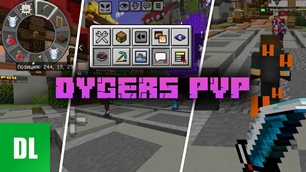
The Dygers PVP resource pack for Minecraft PE (Bedrock) collects the most popular PvP packs in a single file. It features a redesigned interface with a HUD menu, minimalist control buttons, a circular quick access bar, highlighting of invisible players, and optimizations for stable FPS in combat.
Features of the Dygers PVP resource pack
This pack is designed for playing on Anarchy and griefer servers, where quick reactions and a clear screen are essential. All packs within are pre-selected to avoid conflicts, eliminating the need to manually arrange the resource order in Minecraft PE (Bedrock). Experimental features are not required.
The pack is approximately 15 MB in size. It can be activated with a single button in the "Global Resources" section and works both in a single-player world and on any server in Minecraft PE (Bedrock).
Interface and Controls
Standard menus and buttons have been replaced with cleaner and more informative ones. The start screen, world loading screen, inventory, chests, trading, and settings have been updated—the appearance is now closer to Java Edition while remaining touchscreen-friendly in Minecraft PE (Bedrock).
HUD Menu and Toggles
The HUD button at the top of the screen opens a panel with toggles: coordinates and chunks, player list, night vision, chat display, and other small features. All can be enabled directly during gameplay, without having to go into settings.

Control Buttons
Bulky gray buttons have been replaced with translucent elements with thin outlines. They are clearly visible against any background without obstructing your view—this is noticeable in both PvP and while building in Minecraft PE (Bedrock).
Circular Quick Access Bar
The hotbar has been transformed into a circular item wheel that can be moved to any part of the screen. To move, hold the three dots in the center of the bar, and holding it again opens the bar itself in Minecraft PE (Bedrock).

Combat Improvements
The second part of the build includes visual tweaks that directly impact the outcome of combat in Minecraft PE (Bedrock). Unnecessary effects have been removed, and relevant information has been highlighted.
Low Flame and Short Swords
The flame height has been significantly reduced, making enemies visible even when you're on fire. Swords have been made shorter, giving you a wider field of view and making it easier to control the distance to your enemy in Minecraft PE (Bedrock).
Highlighting for Invisibility and Effects
Players under the influence of an invisibility potion begin to emit noticeable yellow particles, while other potions—regeneration, speed, and others—are each colored differently. This allows you to see both the player's position and the effects they are currently under in Minecraft PE (Bedrock).

Highlighted Ores and FPS
All ores now have a bright outline and are visible even in the dark from a distance, making high-end gear crafting faster. Textures have been optimized, and the number of rain particles has been reduced, resulting in more stable FPS on low-end phones in Minecraft PE (Bedrock).
Build Settings
The pack has its own menu: click the gear next to Dygers PVP in the global resources. There, you can access the Sunny Skybox slider to select the sky and the Ultimate Survival block with separate Health and Damage toggles. These settings can be changed at any time, so you can tailor the pack to your Minecraft PE (Bedrock) playstyle.

This build includes all the best resource packs at once:
Atomic Ultimate PVP
The Ultimate Guide to Dygers PVP
If you are exploring the vast world of Minecraft modifications, Dygers PVP by marsdygers is a standout texture that deserves your attention. With over 12,797 downloads, it has become a staple for players looking to enhance their experience. As the creator describes it, this project is "Resource pack for PvP players". Whether you are a veteran builder constructing massive cities, or simply a casual player looking to upgrade your survival world, this guide will provide you with all the essential details on how Dygers PVP alters the game.
What Makes It Special?
Unlike standard textures that simply alter superficial elements, Dygers PVP introduces a wide array of visual and mechanical features designed to seamlessly blend into the vanilla aesthetic. marsdygers has clearly spent significant time refining the project to ensure that every aspect feels polished and responsive for version 1.21.
Installation Guide
Getting Dygers PVP up and running is straightforward. Follow these step-by-step instructions:
- Verify Your Version: Ensure your Minecraft launcher is set to version 1.21.
- Install Mod Loader (if required): If this is a mod, download the compatible loader (Forge, Fabric, NeoForge).
- Download the File: Click the secure download button above to retrieve the official file from CurseForge.
- Move the File: Place the downloaded file into your `mods`, `shaderpacks`, or `resourcepacks` folder depending on the texture type.
- Launch and Enjoy: Open Minecraft, navigate to the respective settings menu, and activate Dygers PVP.
Compatibility & Performance
Compatibility is robust. Dygers PVP is designed specifically for version 1.21, taking full advantage of the latest engine optimizations. During typical gameplay, this addition maintains a stable frame rate, though lower-end laptops might experience slight stuttering. We recommend pairing this with performance boosters like Sodium or Iris to guarantee a silky-smooth experience.