Why Horror Shader is a top-tier shader mod for Minecraft 1.21.100
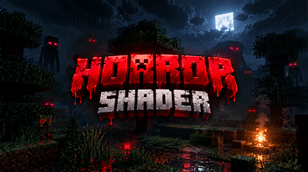
Developed by the talented creator lifeigniter, Horror Shader stands out as a highly recommended selection for your Minecraft client. It is fully optimized, compatibility-tested, and brings a major upgrade to the gameplay experience in Minecraft version 1.21.100.
⚙️ Quick Resource Specs
| Mod Creator | lifeigniter |
| Latest Version | 1.21.100 |
| Supported Game Versions | 1.21.100 |
| File Size | 55.63 KB |
| Last Updated | |
| Total Downloads | 9,525 downloads |
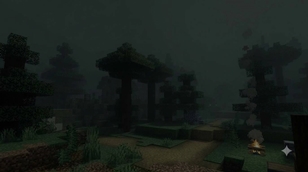
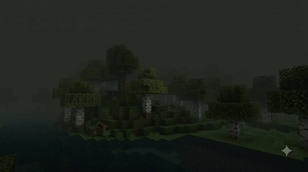
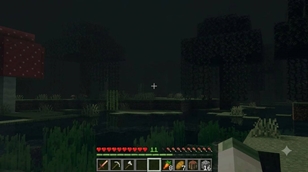
Horror Shader rebuilds Minecraft Bedrock's atmosphere from the ground up around a single idea: you should never feel safe seeing far. This isn't a "spooky night filter" — it's a full Vibrant Visuals (PBR) shader that touches every fog, lighting, atmosphere, and color-grading identifier the game exposes, so there is no biome, no time of day, and no dimension where the old, comfortable render distance survives.
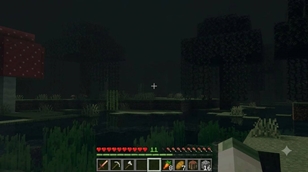
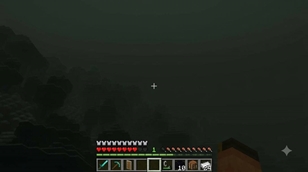
The fog is the core of the pack. Instead of the normal draw-distance fog that fades in gently near your render distance setting, this shader locks fog to a fixed distance in blocks — completely independent of your video settings. Walk through grass, desert, taiga, ocean, cave, doesn't matter: open air fog starts closing in at 3 blocks and turns to solid black by 10. Get caught in rain or snow and it collapses further, to about 6 blocks. Go underwater and you're blind past 3 — the water itself was recoloured to a murky, near-black green-blue so it swallows light instead of reflecting it. On top of the distance fog, volumetric fog density is pushed to maximum and set uniform at every height, so there's no "climb a mountain to see above the mist" escape. The fog is genuinely everywhere, all the time.
Every single one of the 18 distinct fog presets Minecraft's biome system can call — default, swamp, ice plains, frozen ocean, mushroom island, lush caves, pale garden, cherry grove, the Nether, and The End included — was individually rewritten with these same extreme values, so there's no biome left running the old settings by accident.
Lighting was gutted to match. The sun's peak brightness was cut from a normal daytime value all the way down to a dim, overcast-feeling glow — so even "daytime" reads as heavy, grey, pre-storm light rather than a bright sky. Moonlight is almost nonexistent. Ambient fill light was dropped to a sickly, desaturated green-grey so shadows don't just go dark, they go wrong. The Nether gets its own dim, ember-tinted version of the same treatment, and The End gets a cold violet-grey near-darkness of its own, separate lighting files were written for each so nothing falls back to a "safe" default.
Color grading was crushed and drained. Saturation across shadows, midtones and highlights was cut to roughly a third of normal, contrast was pushed up so darks go nearly black instead of grey, and a cool-to-warm gain shift pulls a faint sick tint through the mids and shadows. Shadow maps were sharpened (2048 texel resolution) so what little detail survives the fog reads as hard, stark, and unwelcoming rather than soft and diffuse.
Water colour was overwritten across all 87 biomes that define it, so lakes, rivers, oceans, and swamps all share the same murky near-black surface tint — nothing looks inviting to swim in.
What this pack does not do: it doesn't touch a single texture file. Every block, item, and mob still looks exactly like vanilla Minecraft (or whatever texture pack you stack above/below it) — only the light falling on them, and the fog standing between you and them, has changed. That also means it's extremely lightweight and stacks cleanly with any texture pack.
Requirements: Minecraft Bedrock 1.26 or newer, with PBR / Vibrant Visuals enabled in Video settings (a compatible GPU or the software PBR fallback is required — without PBR enabled, none of the fog, lighting or color-grading changes will apply).
Credits
Horror Shader
Author: lifeigniter

Built on Minecraft Bedrock's Vibrant Visuals (PBR) deferred-rendering
system using publicly documented resource pack fog, lighting,
atmosphere, color grading and water settings.

Fog, lighting, atmosphere, color grading, water and shadow tuning,
biome-wide horror pass across all 88 biomes and both non-Overworld
dimensions: lifeigniter
The Ultimate Guide to Horror Shader
If you are exploring the vast world of Minecraft modifications, Horror Shader by lifeigniter is a standout shader that deserves your attention. With over 9,525 downloads, it has become a staple for players looking to enhance their experience. As the creator describes it, this project is "An oppressive horror shader — unlimited near-black fog caps visibility to roughly 10 blocks everywhere you go, day or night, rain or clear, in every dimension. Sickly desaturated light, crushed dark shadows, and pitch-black murky water turn every worl ..". Whether you are a veteran builder constructing massive cities, or simply a casual player looking to upgrade your survival world, this guide will provide you with all the essential details on how Horror Shader alters the game.
What Makes It Special?
Unlike standard shaders that simply alter superficial elements, Horror Shader introduces a wide array of visual and mechanical features designed to seamlessly blend into the vanilla aesthetic. lifeigniter has clearly spent significant time refining the project to ensure that every aspect feels polished and responsive for version 1.21.100.
Installation Guide
Getting Horror Shader up and running is straightforward. Follow these step-by-step instructions:
- Verify Your Version: Ensure your Minecraft launcher is set to version 1.21.100.
- Install Mod Loader (if required): If this is a mod, download the compatible loader (Forge, Fabric, NeoForge).
- Download the File: Click the secure download button above to retrieve the official file from CurseForge.
- Move the File: Place the downloaded file into your `mods`, `shaderpacks`, or `resourcepacks` folder depending on the shader type.
- Launch and Enjoy: Open Minecraft, navigate to the respective settings menu, and activate Horror Shader.
Compatibility & Performance
Compatibility is robust. Horror Shader is designed specifically for version 1.21.100, taking full advantage of the latest engine optimizations. During typical gameplay, this addition maintains a stable frame rate, though lower-end laptops might experience slight stuttering. We recommend pairing this with performance boosters like Sodium or Iris to guarantee a silky-smooth experience.