

Why ZakoOpt is a top-tier mod mod for Minecraft 1.21
Developed by the talented creator 3AK0, ZakoOpt stands out as a highly recommended selection for your Minecraft client. It is fully optimized, compatibility-tested, and brings a major upgrade to the gameplay experience in Minecraft version 1.21.
⚙️ Quick Resource Specs
| Mod Creator | 3AK0 |
| Latest Version | 1.21 |
| Supported Game Versions | Minecraft 1.21+ |
| File Size | 483.31 KB |
| Last Updated | |
| Total Downloads | 35,186 downloads |
ZakoOpt
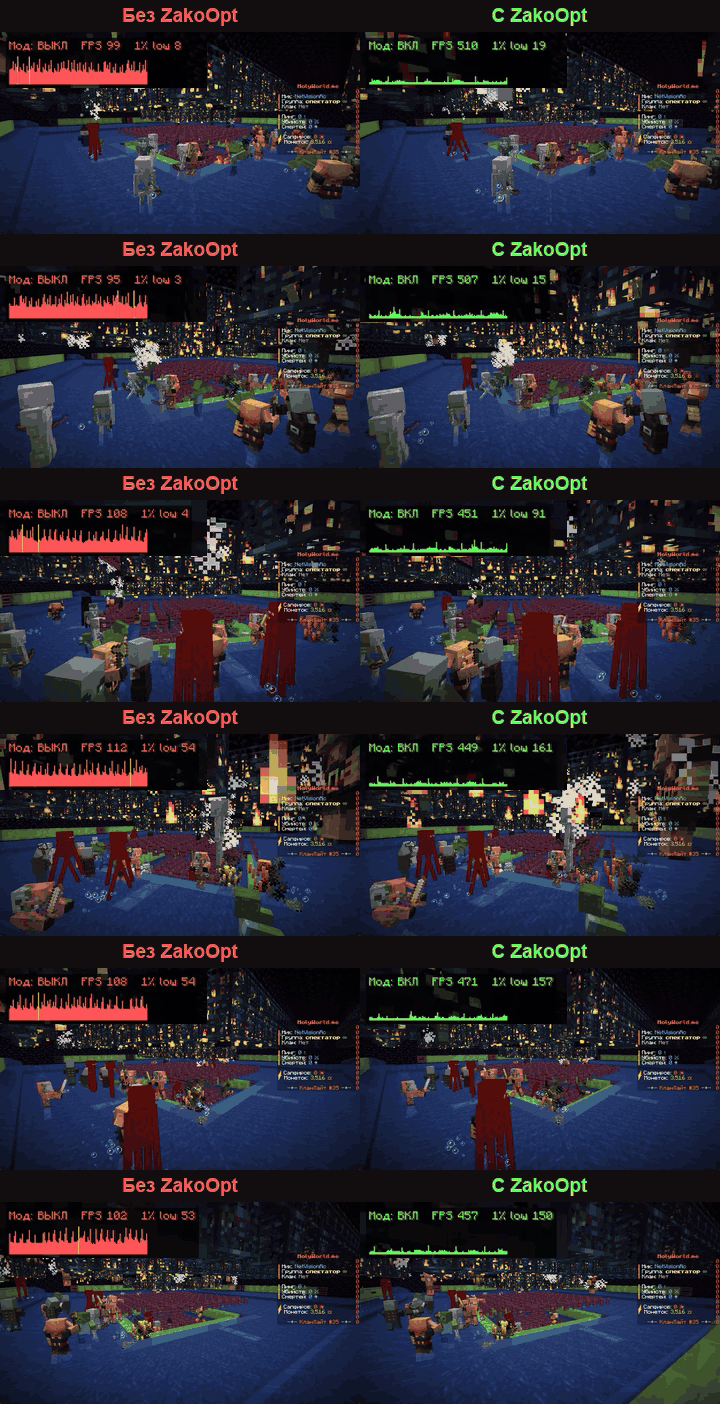
ZakoOpt is a client-side mod that takes CPU load off rendering entities, block entities, particles and the HUD. It helps most on busy spawns with crowds of players, on farms (mobs, spawners, pistons), around piles of dropped items and holograms, and in big Create factories.
The gain depends on your PC and the scene. If your GPU is the bottleneck or there is little on screen, you may see no difference. If your FPS drops, turn options off one by one (each has a tooltip) and report it on GitHub.
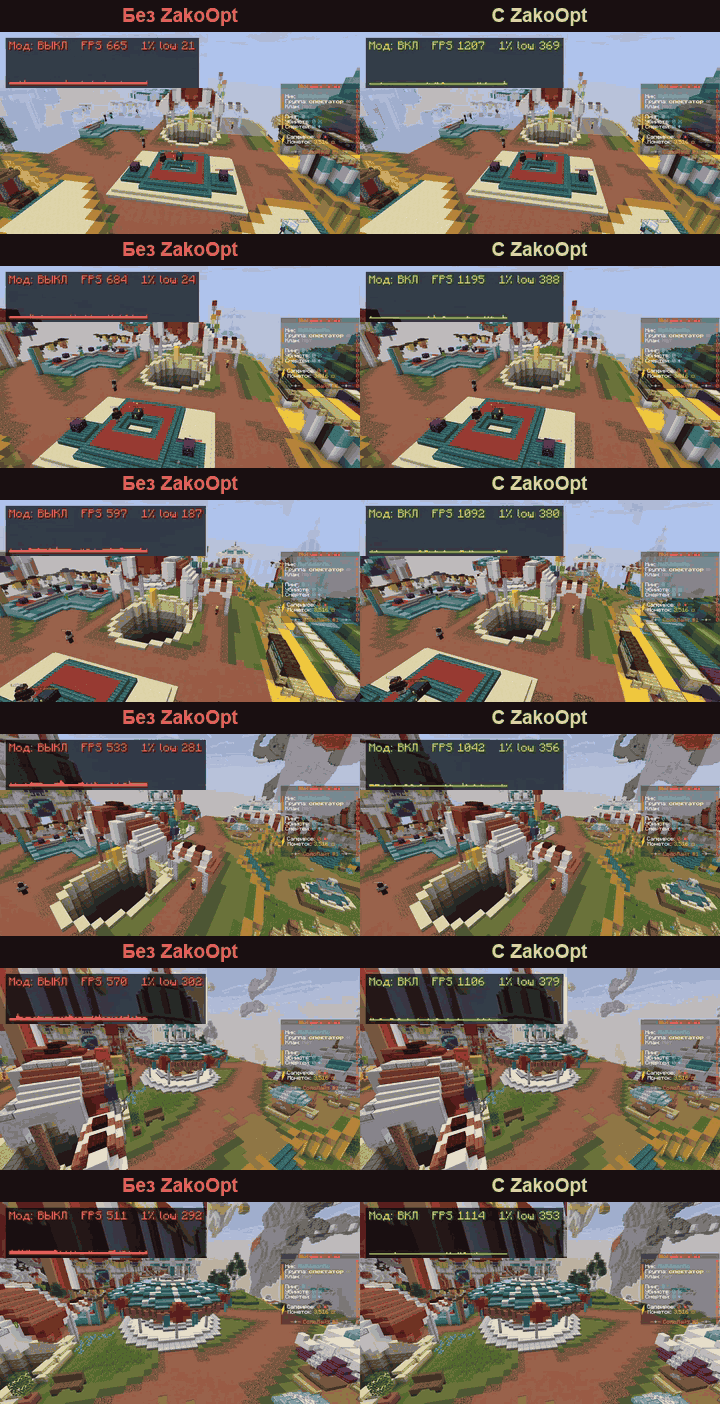
Recorded on the same replay: Ryzen 9 7950X3D limited to 12 threads, RTX 5080, 1920×1080, Sodium 0.8.14 + Lithium 0.21.4 + ImmediatelyFast 1.14.3, Minecraft 1.21.11. Your numbers will differ.
Create (NeoForge 1.21.1)
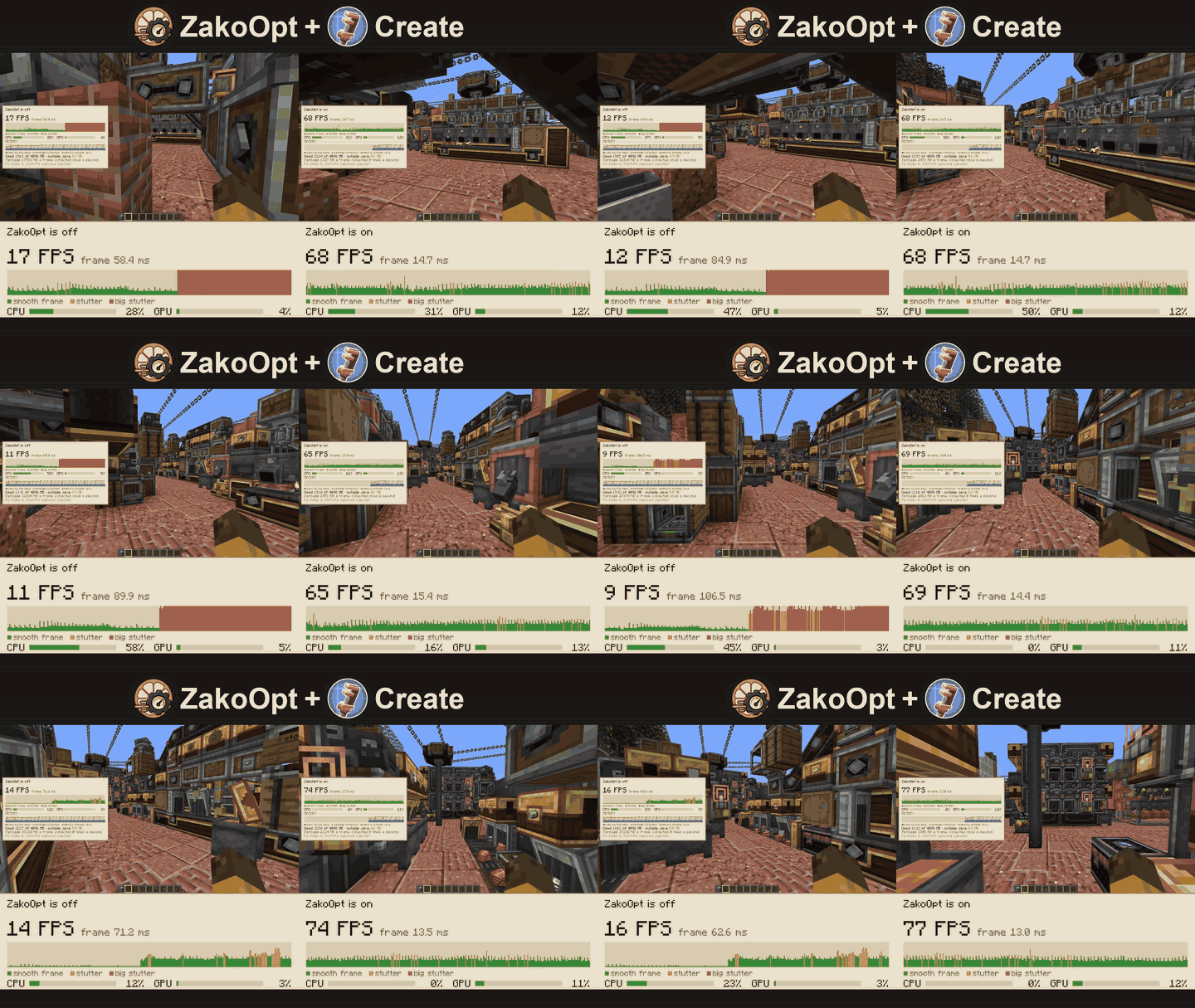
A factory district with 16 Create factories: 13 FPS without ZakoOpt, 91 FPS with it.
- Items on belts, filter slots and factory gauge paths are drawn once and replayed instead of rebuilt every frame.
- Far machines rest: Create machines past 80 blocks skip their client-side animation tick (distance adjustable, 64–256). The server keeps the real state, so nothing stops working.
- Package address matching no longer recompiles the address pattern on every check.
- All Create optimizations have their own tab in the settings and can be turned off one by one. Works with Create Aeronautics (Sable).
Features
- Entities: LOD for far mobs and players, player skin atlas, models built on several CPU cores, enchantment glint included.
- Items: LOD for far dropped items, no per-frame face sorting, optional "one copy per stack", fewer allocations for dropped items.
- Farms: cached spawner mobs, cached piston-moved blocks.
- Blocks: cached block breaking cracks.
- Particles: LOD, light once per tick, built on several cores.
- Text and HUD: cached name tags, holograms, chat, scoreboard and signs; HUD and animated GUI items redraw at monitor refresh rate.
- Rendering: ring vertex buffer, one GPU sync per frame, fewer framebuffer switches.
- Monitor: F6 shows an FPS and frame-time overlay over the game, Shift+F6 turns ZakoOpt on and off on the fly to compare.
Every optimization has its own toggle: with Sodium in Video Settings → ZakoOpt, without it through Mod Menu. Some features are not available on every version.
Requirements: Minecraft 1.21.1, 1.21.4, 1.21.8, 1.21.10, 1.21.11, 26.1.2, 26.2 or 26.3. Fabric on every version (with Fabric API), NeoForge on 1.21.1 and 26.x. ImmediatelyFast is required, Sodium is optional. Works with VulkanMod, Iris, Lithium. Client-side only.
Bugs and crashes: GitHub Issues, with your game version, mod list and latest.log or crash report.
LGPL-3.0. If you fork it or use the code, keep the credit: Zako, t.me/StarikZako.
The Ultimate Guide to ZakoOpt
If you are exploring the vast world of Minecraft modifications, ZakoOpt by 3AK0 is a standout mod that deserves your attention. With over 35,186 downloads, it has become a staple for players looking to enhance their experience. As the creator describes it, this project is "Client-side optimization addon for Sodium. Up to +80% FPS at busy spawns and over 3x FPS on mob farms, with smoother 1% lows. Works with Lithium, ImmediatelyFast and Iris.". Whether you are a veteran builder constructing massive cities, or simply a casual player looking to upgrade your survival world, this guide will provide you with all the essential details on how ZakoOpt alters the game.
What Makes It Special?
Unlike standard mods that simply alter superficial elements, ZakoOpt digs deep into the game's engine to provide a cohesive, performance-focused experience. 3AK0 has clearly spent significant time refining the project to ensure that every aspect feels polished and responsive for version 1.21.
Installation Guide
Getting ZakoOpt up and running is straightforward. Follow these step-by-step instructions:
- Verify Your Version: Ensure your Minecraft launcher is set to version 1.21.
- Install Mod Loader (if required): If this is a mod, download the compatible loader (Forge, Fabric, NeoForge).
- Download the File: Click the secure download button above to retrieve the official file from CurseForge.
- Move the File: Place the downloaded file into your `mods`, `shaderpacks`, or `resourcepacks` folder depending on the mod type.
- Launch and Enjoy: Open Minecraft, navigate to the respective settings menu, and activate ZakoOpt.
Compatibility & Performance
Compatibility is robust. ZakoOpt is designed specifically for version 1.21, taking full advantage of the latest engine optimizations. Since this is heavily focused on optimization, you can expect significant frame rate improvements on both low-end and high-end hardware.