Why Detailed Tooltips is a top-tier texture pack mod for Minecraft 1.21
Developed by the talented creator KENPITU, Detailed Tooltips stands out as a highly recommended selection for your Minecraft client. It is fully optimized, compatibility-tested, and brings a major upgrade to the gameplay experience in Minecraft version 1.21.
⚙️ Quick Resource Specs
| Mod Creator | KENPITU |
| Latest Version | 1.21 |
| Supported Game Versions | Minecraft 1.21+ |
| File Size | 5.87 MB |
| Last Updated | |
| Total Downloads | 1,370 downloads |
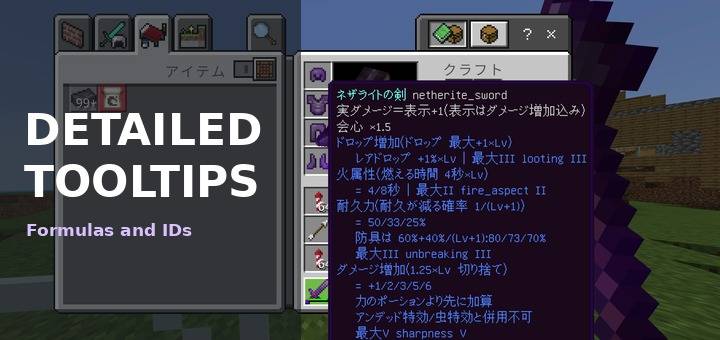
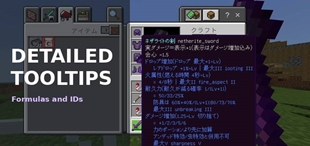
Adds the numbers Minecraft does not tell you to item tooltips: formulas, per-level values and command IDs.
Works in every language
Since 1.1.0 the descriptions are shown in all 29 languages Minecraft offers, in whatever language your game is set to. Enchantment, effect and item names use the game's own official names for that language.
The English and Japanese texts were written by me. The other languages were translated with care, but if a word sounds unnatural in your language, tell me in the comments.
What it adds
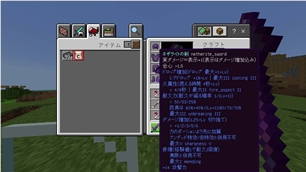
Enchantments: the formula, the value at every level, when it applies, downsides, which enchantments it cannot be combined with, the max level and the command ID. The game adds the level of the item after it, so you can read the matching value.
Status effects and potions: the formula and values per level, plus the ID.
Weapons: real damage, critical hits and special effects, such as the mace smash formula and the axe disabling shields.
Armor: full-set defence, armor toughness and a guide to how much damage is reduced.
Food: hunger, hidden saturation and the effects each food gives. Flowers show the effect they give in suspicious stew.
Blocks and tools: how much fall damage they reduce (hay bale, slime, water, ladders and more), and what the anvil, grindstone, beacon, glow ink sac and other items do.
Every item and block: its command ID after the name, about 1,900 in total. Banners and beds include their color data value.
In Japanese, it also fixes the mistranslation in the shulker box tooltip.
Settings
Pick one from the dropdown in the pack settings. The last one is selected automatically.
ID only.
Simple. One short line per enchantment and effect.
Detailed, with four choices for the item name above the hotbar: normal, none, 10% or 30% (recommended, the default).
If the tooltip of a fully enchanted item is too tall for your screen, choose Simple.
When you switch items
The name that appears above the hotbar shows only the first line (name and ID) and is faded to 30% by default, so the long descriptions don't cover your screen. You can change how faded it is in the settings. The full text is shown in the inventory.
Notes
Resource pack only. No behaviour pack, no scripts, no commands. Achievements are unaffected, and it works on servers.
A resource pack can only change the text, not the logic. It cannot show only the value for your current level, change the text per item, or show live numbers such as remaining durability.
Values are taken from the Minecraft Wiki for Bedrock Edition and checked in game where possible. If you find a wrong number, tell me in the comments.
Other packs that change the language files or the HUD may conflict. Put this pack above them.
Installation
Download the .mcpack and open it. Enable it under Global Resources in settings. It follows your game language automatically.
Author: kentotukun
日本語
Minecraft が教えてくれない数字を、アイテムの説明に足します。計算式、レベルごとの値、コマンド用の ID です。
どの言語でも使えます
1.1.0 から、Minecraft で選べる全29言語で説明が出ます。ゲームの言語に合わせて自動で切り替わります。エンチャント・効果・アイテムの名前は、その言語のゲームの正式な名前です。
英語と日本語は自分で書きました。ほかの言語も気をつけて訳しましたが、不自然なところがあればコメントで教えてください。
足すもの
エンチャント:計算式、レベルごとの値、いつ効くか、デメリット、併用できないエンチャント、最大レベル、コマンド用の ID。最後にゲームがアイテムのレベルを付けるので、どの値が今の効果か分かります。
ステータス効果・ポーション:計算式とレベルごとの値、ID。
武器:本当のダメージ、会心、特別な効果(メイスの叩きつけの計算式、斧で盾を使えなくする など)。
防具:全身そろえたときの防御力・防具強度と、ダメージがどれだけ減るかの目安。
食べ物:満腹度、隠し満腹度、付く効果。花は怪しげなシチューにしたときの効果。
ブロックと道具:落下ダメージをどれだけ減らすか(干し草の俵・スライム・水・はしご など)と、金床・砥石・ビーコン・輝くイカスミなどの使い道。
すべてのアイテムとブロック:名前の後ろにコマンド用の ID(約1,900種類)。旗とベッドは色のデータ値つき。
日本語では、シュルカーボックスの説明の誤訳も直します。
設定
パックの設定(歯車)のドロップダウンで選びます。一番下が自動で選ばれます。
IDのみ。
シンプル:エンチャントと効果を短い1行で。
詳しく:ホットバーの上に出る名前の濃さを、そのまま・なし・10%・30%(おすすめ・最初はこれ)の4つから選べます。
フルエンチャントの装備で説明が画面からはみ出すときは、シンプルを選んでください。
持ち替えたとき
ホットバーの上に出る名前は、1行目(名前と ID)だけを、最初は30%の薄さで出します。薄さは設定で変えられます。長い説明で画面が隠れません。全部の説明はインベントリで見られます。
注意
リソースパックだけです。ビヘイビアーパック・スクリプト・コマンドは入っていません。実績は無効にならず、サーバーでも使えます。
リソースパックで変えられるのは文字だけです。今のレベルの値だけを出す、アイテムごとに説明を変える、残りの耐久値のような変わる数字を出す、といったことはできません。
数値は Minecraft Wiki の統合版の値をもとにして、できるものはゲームで確認しています。間違いを見つけたら、コメントで教えてください。
言語ファイルや画面表示(HUD)を変える他のパックとは、競合することがあります。その場合は、このパックを上に置いてください。
入れ方
.mcpack をダウンロードして開きます。設定の「グローバルリソース」で有効にします。ゲームの言語に合わせて自動で切り替わります。
作者:kentotukun
The Ultimate Guide to Detailed Tooltips
If you are exploring the vast world of Minecraft modifications, Detailed Tooltips by KENPITU is a standout texture that deserves your attention. With over 1,370 downloads, it has become a staple for players looking to enhance their experience. As the creator describes it, this project is "Adds formulas, per-level values and command IDs to enchantments, effects, weapons, armor, food and blocks in item tooltips. In all 29 languages Minecraft offers. Resource pack only, works on servers.". Whether you are a veteran builder constructing massive cities, or simply a casual player looking to upgrade your survival world, this guide will provide you with all the essential details on how Detailed Tooltips alters the game.
What Makes It Special?
Unlike standard textures that simply alter superficial elements, Detailed Tooltips introduces a wide array of visual and mechanical features designed to seamlessly blend into the vanilla aesthetic. KENPITU has clearly spent significant time refining the project to ensure that every aspect feels polished and responsive for version 1.21.
Installation Guide
Getting Detailed Tooltips up and running is straightforward. Follow these step-by-step instructions:
- Verify Your Version: Ensure your Minecraft launcher is set to version 1.21.
- Install Mod Loader (if required): If this is a mod, download the compatible loader (Forge, Fabric, NeoForge).
- Download the File: Click the secure download button above to retrieve the official file from CurseForge.
- Move the File: Place the downloaded file into your `mods`, `shaderpacks`, or `resourcepacks` folder depending on the texture type.
- Launch and Enjoy: Open Minecraft, navigate to the respective settings menu, and activate Detailed Tooltips.
Compatibility & Performance
Compatibility is robust. Detailed Tooltips is designed specifically for version 1.21, taking full advantage of the latest engine optimizations. During typical gameplay, this addition maintains a stable frame rate, though lower-end laptops might experience slight stuttering. We recommend pairing this with performance boosters like Sodium or Iris to guarantee a silky-smooth experience.